What is Cisco Packet Tracer 9.0.0 ?
Cisco Packet Tracer is a network simulator software created by Cisco Systems. Cisco Packet Tracer download is free for self learners. Previous versions were only available for Cisco Networking Academy (Netacad) students and instructors. Download Cisco Packet Tracer after registering on Cisco Netacad website. Every registered user can also access a free online course named "Getting Started with Cisco Packet Tracer".
Packet Tracer 9.0.0 is required to complete the 26 industrial (OT) security labs included in the new Netacad Industrial Networking Essentials course. This course has been designed to teach students how to configure secure industrial networks, compliant with the Purdue security model, supporting Industrial Automation Control Systems (IACS). It is also required to attend the following Netacad courses :
- Industrial IoT and Control Systems in Energy
- Industrial IoT and Control Systems in Manufacturing
- Industrial Cybersecurity Essentials
It includes labs to simulate a Smart Grid (power disctribution network in the energy sector), simulate a factory for mixing raw materials, practice PLC programming with low code, configure an industrial DMZ, ...
Download Cisco Packet Tracer 9.0
You can download Cisco Packet Tracer 9.0.0 for FREE from the official Cisco Netacad website. The software comes with several tutorial files that allow academy students to enhance their learning experience.

Step 1 : Connect to the Cisco Networking Academy ressource hub
Step 2 : Log in with your Cisco account or configure SSO with your Google account
Step 3 : Click on the Cisco Packet Tracer download link to access the official download page. The page provides basic guidelines to install Cisco Packet Tracer.
Packet Tracer 9.0.0 build 810 checksums
Cisco Packet Tracer 9.0.0 build 9.0.0.0810 (october 2025 official release) can be downloaded from the Cisco Netacad Ressource Hub. Do not download Cisco Packet Tracer from any website or torrent source different than the official Cisco Netacad website. Please find below the SHA256 checksums for the official Packet Tracer packages so you can check if the software you downloaded is correct.
File: CiscoPacketTracer_900_win_64bit.exe
SHA256: 146DFB9F40A79D09B05764CBB940D392E08A42039AB43FE5C1F301DE03A763D4
File: CiscoPacketTracer_900_Ubuntu_64bit.deb
SHA256: DD9AC0D4C7FC37DCB68F627FD7C7E6FA6D4200C14492526E5618B9BD172ED920
File: CiscoPacketTracer_900_macOS_64bit.dmg
SHA256: 843B2B0C48AF33C36E1CB1083B3F017095682A5B870D65F5CD38666D6D7522F1
Packet Tracer 9.0.0 is compatible with Microsoft Windows 10 and Windows 11.
You can also download the installer for MacOS 12 or newer, or as a debian package (.deb) for Ubuntu 22.04 or 24.04 LTS. MacOs 10, 11 and Ubuntu 20.04 are no longer supported.
How to update Cisco Packet Tracer ?
The current downloadable version of Cisco Packet Tracer on is Packet Tracer 9.0.0 build 0810.
Each Packet Tracer version is installed in it's own directory and can cohexist with previous Packet Tracer releases. Multiple Packet Tracer versions can run at the same time on the same computer.
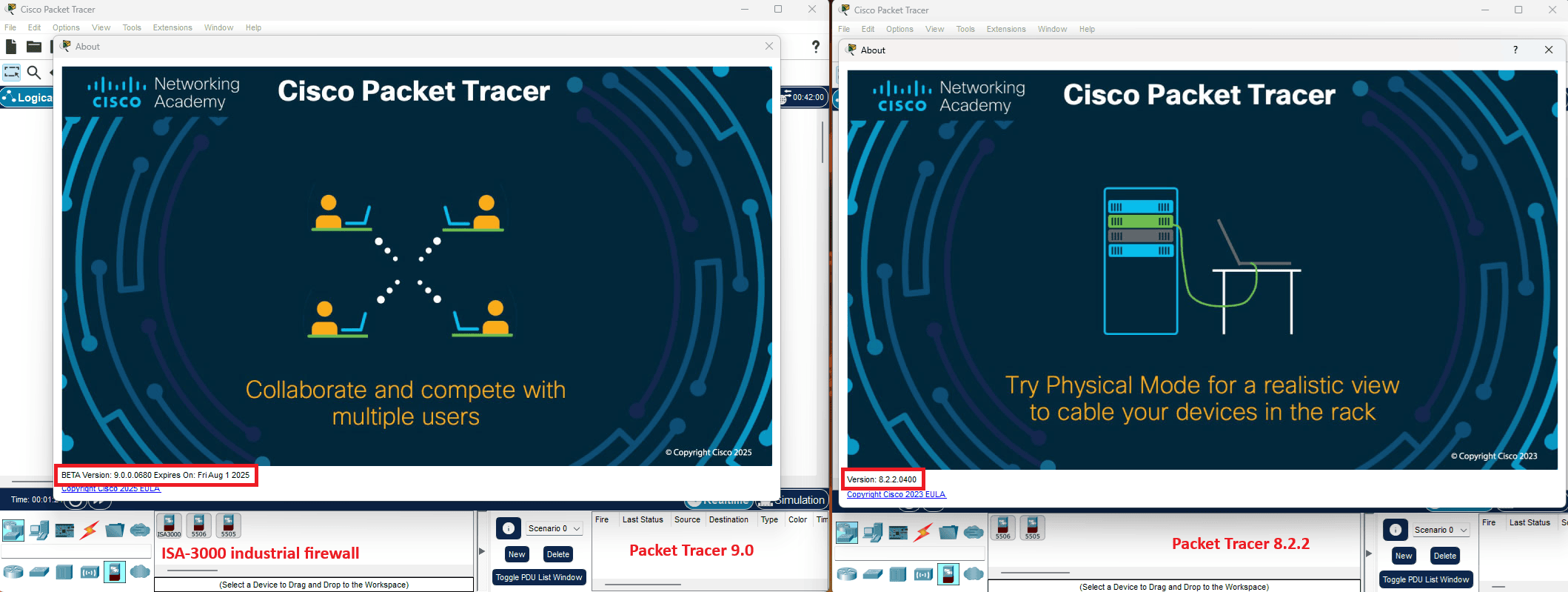
It is recommended to keep Packet Tracer 8.2.2 install in parallel with Packet Tracer 9.0 :
- Packet Tracer 8.2.2 is installed in the "C:\Program Files\Cisco Packet Tracer 8.2.2" directory
Binary is "C:\Program Files\Cisco Packet Tracer 8.2.2\bin\PacketTracer.exe - Packet Tracer 9.0 is installed in the "C:\Program Files\Cisco Packet Tracer 9.0.0" directory.
Binary is "C:\Program Files\Cisco Packet Tracer 9.0.0\bin\PacketTracer.exe
You may have to manually recreate a shortcut for Packet Tracer 8.2.2 in Windows start menu.
Download Cisco Packet Tracer 8.2.2 (previous release)
Packet Tracer 8.0 was released in 2021. It introduced a new SDN Network Controller which enables network devices programming through API, a new Packet Tracer Tutored Activities (PTTA) engine, IPv6 and IOS15 device improvements.
Cisco Packet Tracer 8.2.2 checksums
File: CiscoPacketTracer822_64bit_setup_signed.exe
MD5: D1D65286B7EE0A1E8B9DCE107AC94F4C
SHA-1: 5AB531B64C8E0D57F85F3D073CB31CC8E28BBCAF
File: CiscoPacketTracer822_32bit_setup_signed.exe
MD5: 0EB36ED8FEB5B9E82791B73D0787C5DB
SHA-1: 7182CB0C105741812EE0E2CE5767C0BCAC9A7679
File: CiscoPacketTracer822_amd64_signed.deb
MD5: 1CED4753C05B5E880DAAE8C4C435BFFA
SHA-1: 35BD819FCB0E2ED1DF3582387D599E4A9C6BF2C9
File: CiscoPacketTracer822_setup_mac_signed.dmg
MD5: 178DDD9E955C165874123018B743AA27
SHA-1: 7182CB0C105741812EE0E2CE5767C0BCAC9A7679
Packet Tracer 8.2.2 is compatible with Microsoft Windows 10 and Windows 11. You can also download Packet Tracer for mac os x 10.14, as a debian package (.deb) for Ubuntu 20.04 and 22.04 LTS. Microsoft Windows 7, 8.1, and Ubuntu 18.04 are no longer supported.
Download other Cisco network simulators
Cisco Modeling Labs 2.9.1
Cisco Modeling Labs is a virtualized network simulation environment offering Netacad students the chance to practice networking labs using real Cisco devices images (IOS, IOS-XE, ASA, ....). Buying expensive network devices is not required anymore for optimal CCNP Enterprise or CCIE exams preparation experience. Cisco Modeling Labs OVA can be downloaded for free on Cisco website. Five Cisco network devices images are provided for free in CML 2.9.1 reference platform ISO refplat-20250718-ise-iso.zip archive. Additional node definitions can be downloaded for free on CML community github repository.
CML 2.9.1 fixes several issues of Cisco Modelin Labs like failed upgrades to CML 2.9.0, system updates which could not be installed, or LDAP authentication issues. It also fixes CPU locks in SD-WAN Manager.
Cisco Modeling Labs 2.9.1 Free Tier OVA: cml2_2.9.1-7_amd64-7.ova
SHA 512 checksum: c08184bfa38f011ca1b8e2ab99029842f093e68b751ddcb366bf9afc3781ef2e20b5a75256bf558bd001d27e9ad0f7a002c9b02e71c2fdc634ef458c9ea38ae5
Cisco Modeling Labs 2.9.1 reference platform ISO: refplat-20250718-ise-iso.zip
SHA512 checksum: 5fa1e2715323f2bebec8ede444ff9f96f0f2f389218c6d9f240c0ce22d63922e98187d3191195b055ca4db2e44658f128a237fe2032892e79bcd529341d5c7c3
Cisco NX-OSv 9000 appliance
The NX-OSv 9000 is a virtual appliance designed to simulate the control plane of a Cisco Nexus 9000 switch. The NX-OSv 9000 shares the same software image running on Cisco Nexus 9000 hardware platform. The NX-OSv 9000 software emulates line card (LC) ASICs and all interactions from the control plane to the relay switch ASICs.
NX-OSv 9000 is a modern emulator for datacenter certification training. It helps engineers to test network automation prior to production deployment. The following NX-OSv 9000 features are officially supported in Cisco Modeling Labs 2.8.1:
- CDP : OK
- SVI (wwitch virtual interface) : OK
- Port-security : OK
- Port-channel : OK
- vPC : OK
- Spanning-tree : OK
- HSRP betweeen two N9K: OK
- Loopback interface : OK
- Routed (L3) port : OK
NX-OSv 9000 virtual appliance is compatible with GNS3, KVM, or VMware NSX virtualization environments. The most recent version of NXOSv is 10.6(1)F. This version adds the following new features :
- Support for SG-RouterID Hash
- IPv6 Support for UDP Jitter Operations
- Passwordless Authentication for gRPC via UDS
- Host Identity Based Authorization (HIBA)
- EVPN ESI Multi-Homing
- Support RPKI community when connected via eBGP
- PIM Graceful-SPT Feature to Be Default
- TACACS+ TLS 1.3 support with IEFT draft
- L2VLAN segmentation with SVI
Download NX-OSv 9000 10.6(1)F from Cisco website
